
How to Clone a Course
Cloning is not recommended, but it can be helpful in specific scenarios. These are basic instructions. It is important to make sure that you replace any information from the original course that is not relevant to the new course!
1. From the original, choose Clone.
2. Course Description à Change the Title, Date, Credits etc.
3. Course Settings à delete external ID à Choose clone (at the bottom of the page)
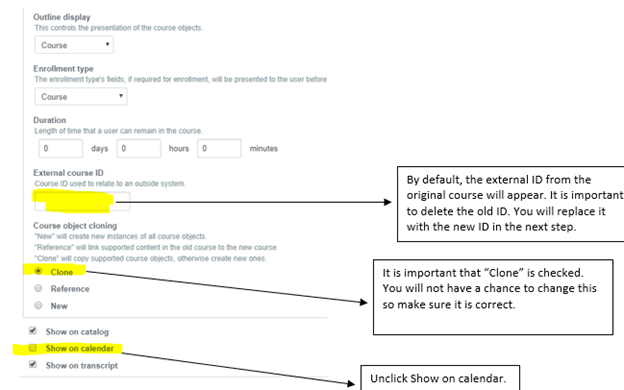
- The objects in the course outline will be cloned, so, you will need to make changes (such as customized evaluation questions), if needed.
- Because the course is being cloned, if there is an application for this activity, the course needs to be connected to the application. From the application, go to Edit, Manage, Related Course. Search for the course by the Node ID and select the course.

Did you:
Change the External ID?
Change the information in the ACCME Tab, if applicable?
Update the evaluation?
Close enrollments, if applicable?
Connect the application, if applicable?