
Title and Description.
*Title. Review the title and make sure it is correct. Note: If this is a repeating course, add the date to the title.
*Program description. Provide a description of the course. This is also the default for what is used on the course catalog. To change what you want posted on the catalog choose (edit summary) to override the Program Description text.
Course Image. If you are advertising on the course landing page, you have the option to upload an image to appear in line with the course title and description.
*Target Audience. At a minimum, the target audience must represent the credits being awarded.
*Learning objectives. Enter learning objectives. Tip: Copy and Paste from application.
*Accreditation. Insert the correct statement. You must include the Joint Accreditation Logo.
- In Ethos, click the image icon and access the logo from the Ethos library. You do not need to upload it over and over again. Tip: In Ethos, the dimensions H 125 and W 86 with Left Alignment works well. Add a line after the accreditation statement so the credit designation statements are below the logo.

- Outside of Ethos: Access it on the Y:\CCEHS\Accreditation Documents and Forms\Jointly Accredited Provider Mark
- Or right click and save.:
 .
.
*Date & Time: (read carefully)
Start date:
Live activity using the CCEHS registration system, this is the earliest date and time you want registration to be available.
Live activity not using the registration system, this is the date that you want the evaluation/credit to be available (generally the date of the course).
Enduring material, this is the date the activity is available to be accessed.
Expiration date:
Live or virtually live activity, the expiration date is the date that you want the evaluation/credit to end (i.e. not accessible). This should not be more than 30 days past the event date.
Enduring material, this is the date that the course will expire.
Check Live for a live or virtual live activity.
The event date is the start and end date and times of the live (in person) or virtually live course.
Note: registration using Ethos automatically expires 4 hours after the start time. For example, if a course starts at 8:00 AM, a person cannot register for the course at 1:00 PM.
Faculty & Disclosure.
*Enter faculty/speaker information. Enter Name, Degree, Affiliation (at a minimum), if you are using Ethos for Audience Disclosure (refer to Audience Disclosure Guidelines) you must include the COI Disclosure Statement.
Skip Disclosure Link.
Course Format & Instructions.
*Format. Choose the format that is appropriate for this activity. This selection is a filter in the course application.
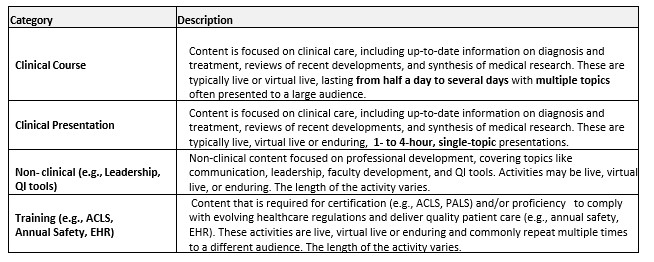
*Category. Choose the category that is appropriate for this activity from the table below. This selection will not appear on the course catalog.
Required hardware/software. Use if applicable.
Course Instructions. Anything entered in this field will appear after the person chooses Register on the course page.
Registrations Instructions. Anything entered in this field will appear on the Register tab on the course page.
Include contact information (at minimum: name and email) and registration details if any of the following apply. This ensures learners know who to contact with questions and helps reduce support requests to CCEHS.
You are using Ethos to register learners in advance
The course is posted on the CCEHS catalog
The course link will be used for marketing purposes
Course Completion Message. Anything entered in this field will appear after a person has finished the required objects/course.
*Program. This is the course agenda including start/stop/break/lunch times as applicable.
*Marketing. ALWAYS check Nobody may rate this activity.
*Venue. The certificate uses information from this section.
- Must include Location
- If live (in person) or a combination of live (in person) and virtual, City /State are required.
- If virtual only, enter “Virtual” in City and leave State blank or enter City/State (either way is fine)
- Additional information (specific address) can be included to provide directions, etc.
Exhibitors. This is an optional field to inform potential companies if you are soliciting exhibitors. Reminder: you must follow Guidance on Receiving Funds and Managing Promotion for Continuing Education.
File Attachments. Optional to attach (save to your computer, then click Upload) any documents that you want to be accessible (e.g., brochure, handouts). If the course is on the catalog, it will be accessible to anyone.